
如果免费资源下载的文件为TXT文档 请联系站长更新!站长微信:Lv596999 Telegram:@eapoj “Mql5官网”板块的EA基本都有,大部分是无限制NODLL版,NODLL版本MT1420升级,大多数不可用!这些EA来源为国外花钱买过来的 如有需要,请联系站长! “EA测评”板块资源全部现有,看见不错的,可以联系站长,看EA在确定是否收费。 “无限制EA”板块,大部分免费,下载文件全部存在,都可以免费下载。 站长硬盘EA太多,因大部分时间做交易,做风控,没太多时间更新下载地址,请谅解! 需要更新下载文件,请联系站长微信!国外朋友请联系Telegram。  |
Our Expert Advisor (EA) revolutionizes trading in the Forex market by integrating two powerful strategies – Scaling and Averaging – into a dynamic and adaptable framework. Designed for the MetaTrader4/5 platform, this EA employs innovative techniques to optimize trading outcomes in various market conditions.
Metatrader5 Version | Auto Smart Pro MT4 Live Results | All Products | Contact
Scaling Strategy:
The Scaling strategy capitalizes on trending market movements by initiating multiple trades to ride the momentum. With our EA, Scaling positions are managed with precision using trailing stop-loss mechanisms, ensuring that profits are secured as the market moves in favor of the trade. Traders can customize parameters to fine-tune the scaling approach according to their risk tolerance and profit targets.
Averaging Strategy:
The Averaging strategy acts as a counter-trend mechanism, strategically entering additional positions to average out losses and capitalize on market reversals. Our EA intelligently manages averaging sequences with parameters tailored to secure profits through take-profit levels, effectively mitigating drawdowns and optimizing trade entries.
Combined Strategy:
Our EA dynamically adapts to market conditions by maintaining both trend and counter-trend positions at all times. Regardless of market direction, it ensures a balanced portfolio of trades, with each batch strategically managed to maximize profitability and minimize risk. By combining Scaling and Averaging strategies, traders benefit from a comprehensive approach that enhances overall trading performance.
Key Parameters:
Magic: This parameter serves as a unique identifier for the EA, allowing traders to distinguish between different instances of the Expert Advisor running on their MetaTrader 5 platform.
Use Martingale: When set to true, this parameter enables the Martingale strategy, which increases the lot size after a losing trade. Traders can choose to activate or deactivate this feature based on their risk tolerance and trading preferences.
Multiplier Averaging: This parameter determines the multiplier applied to the lot size for averaging batches when the Martingale strategy is enabled. It allows traders to control the degree of lot size increase for averaging positions.
Multiplier Scaling: Similar to the Multiplier Averaging parameter, this parameter determines the multiplier applied to the lot size for scaling batches when the Martingale strategy is enabled. Traders can adjust this parameter to optimize scaling positions according to their trading objectives.
TakeProfit: The TakeProfit parameter sets the take profit level for averaging batches. Take profit states how many profit points the averaging batch will win.
Step Averaging: This parameter specifies the step size for averaging batches. It determines the distance between averaging positions, allowing traders to control the spacing of trades and optimize trade entries during market reversals.
Step Scaling: Similar to the Step Averaging parameter, the Step Scaling parameter specifies the step size for scaling batches. It enables traders to adjust the distance between scaling positions, optimizing trade entries to capitalize on market trends.
Lots: The Lots parameter sets the initial lot size for trades. Traders can specify the initial lot size according to their account size and risk management strategy.
Max Lot Averaging: This parameter defines the maximum lot size for averaging batches. Even if the lot size calculation exceeds this value due to the Martingale strategy, the EA will not open averaging positions with a lot size greater than the specified maximum.
Max Lot Scaling: Similar to the Max Lot Averaging parameter, the Max Lot Scaling parameter defines the maximum lot size for scaling batches. It ensures that scaling positions do not exceed the specified maximum lot size, regardless of the lot size calculation.
Trailing Stop: The Trailing Stop parameter sets the distance for the stop loss after the trailing start price is reached. It enables traders to secure profits by trailing the stop loss level behind the market price, allowing for potential further gains while mitigating risk.
Trailing Start: This parameter specifies the number of points to win with scaling orders before securing them with a stop loss at a distance equal to the Trailing Stop parameter. It helps traders initiate the trailing stop loss mechanism at the optimal point to maximize profits.
Trailing Step: The Trailing Step parameter determines the frequency of adjusting the trailing stop loss level. It enables traders to follow the market price closely and adjust the stop loss level accordingly, ensuring effective risk management during price fluctuations.
Late Start Averaging: This parameter defines the number of trades after which the EA will begin multiplying lots for averaging batches. It allows traders to delay lot size multiplication until a certain number of trades have been executed, enhancing control over position sizing and risk management.
Close At Drawdown: When set to true, this parameter instructs the EA to close all trades when a specified drawdown level is reached. Traders can choose to activate this feature and specify the drawdown type and value based on their risk management strategy.
Drawdown Type: This parameter determines the type of drawdown used for closing trades, which can be either Drawdown Cash (fixed drawdown in currency amount) or Drawdown Percent (percentage drawdown relative to balance value).
Drawdown to Close Value: This parameter specifies the value of the drawdown type (cash amount or percentage) at which the EA will close all trades. It allows traders to set a threshold for drawdown tolerance and implement effective risk management measures.
Max Trades: The Max Trades parameter defines the maximum number of trades that the EA is allowed to open simultaneously. It helps traders control the exposure of their trading account and manage risk by limiting the number of concurrent trades.
Spread Filter: This parameter prevents the EA from opening trades if the spread exceeds the value specified in this parameter. It helps traders avoid unfavorable trading conditions and maintain optimal execution quality.
Display Information Status: When enabled, this parameter displays relevant trading information such as current drawdown, next lots, trailing start price, etc. It provides traders with valuable insights into the EA’s performance and helps facilitate informed decision-making.
Our EA offers unparalleled flexibility and customization, allowing traders to optimize performance according to their preferred trading style. Whether seeking high profitability or conservative reliability, our Trend-Counter Trend Dynamic Scalping & Averaging Expert Advisor empowers traders to achieve their financial goals with confidence.
Unlock the potential of your trading strategy and experience enhanced efficiency and profitability with our innovative EA.
#tags: auto profit profit point smart invest pro mediere complementare trend
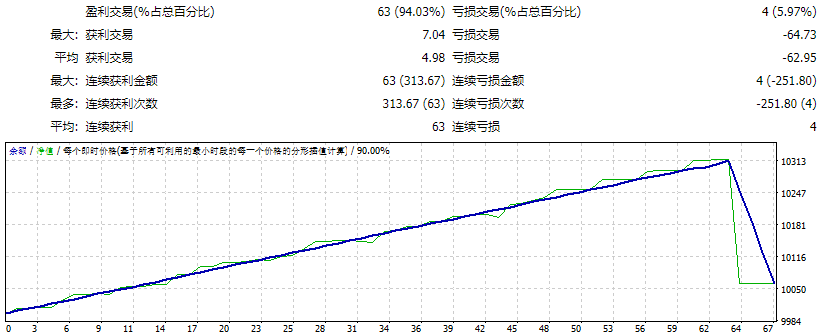
![图片[1]-AutoSmartPro MT4 外汇EA-EA侦探社 - 全球领先的MQL5官网外汇EA机器人MT4自动化交易EA资源免费分享网站](https://sp-ao.shortpixel.ai/client/to_webp,q_glossy,ret_img/https://www.mql5.vip/wp-content/uploads/2024/05/20240514194830-6643c00e5aa5a.jpg)
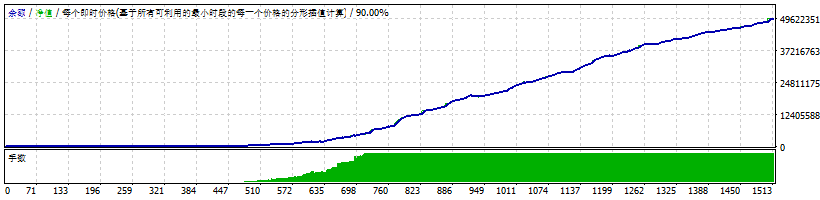
![图片[2]-AutoSmartPro MT4 外汇EA-EA侦探社 - 全球领先的MQL5官网外汇EA机器人MT4自动化交易EA资源免费分享网站](https://sp-ao.shortpixel.ai/client/to_webp,q_glossy,ret_img/https://www.mql5.vip/wp-content/uploads/2024/05/20240514194830-6643c00e890f1.jpg)